 comparison
Regus Alternative for Small Teams: 5 Private Office Picks
Table of Contents
- Why Small Teams Outgrow Regus
- Quick Comparison: 5 Regus Alternatives for Small Teams
- 1. Kiwi Offices: Private Office Space for Small Business
- 2. Industrious: Premium Private Offices With All-Inclusive Pricing
- 3. Office Evolution: Community-Focused Suites and Virtual Services
- 4. Opus Virtual Offices: Business Address and Reception for Remote Teams
- 5. Lucid Private Offices: Secure Suites for Privacy-First Teams
- Flexible Office Lease Terms for Startups: What to Check Before You Sign
- Frequently Asked Questions
Last Updated: September 25, 2026
Why Small Teams Outgrow Regus
Small teams leave Regus when their workspace stops matching how they work. The complaints repeat: thin walls between suites, meeting rooms booked out days ahead, and contracts that run longer than the team's plans.
Quick Comparison: 5 Regus Alternatives for Small Teams
These five options span private suites, virtual offices, and community-focused workspaces, each suiting a different team shape.
| Provider | Model | Best For | Pricing |
|---|---|---|---|
| Kiwi Offices | Private furnished suites | Teams of 1-8 wanting independence | Contact for quote |
| Industrious | Premium private offices | Teams wanting high-end design | Contact for pricing |
| Office Evolution | Suites and virtual services | Solopreneurs wanting community | Contact for pricing |
| Opus Virtual Offices | Virtual office only | Remote-first teams | Contact for pricing |
| Lucid Private Offices | Secure private suites | Privacy-first teams | Contact for pricing |
1. Kiwi Offices: Private Office Space for Small Business
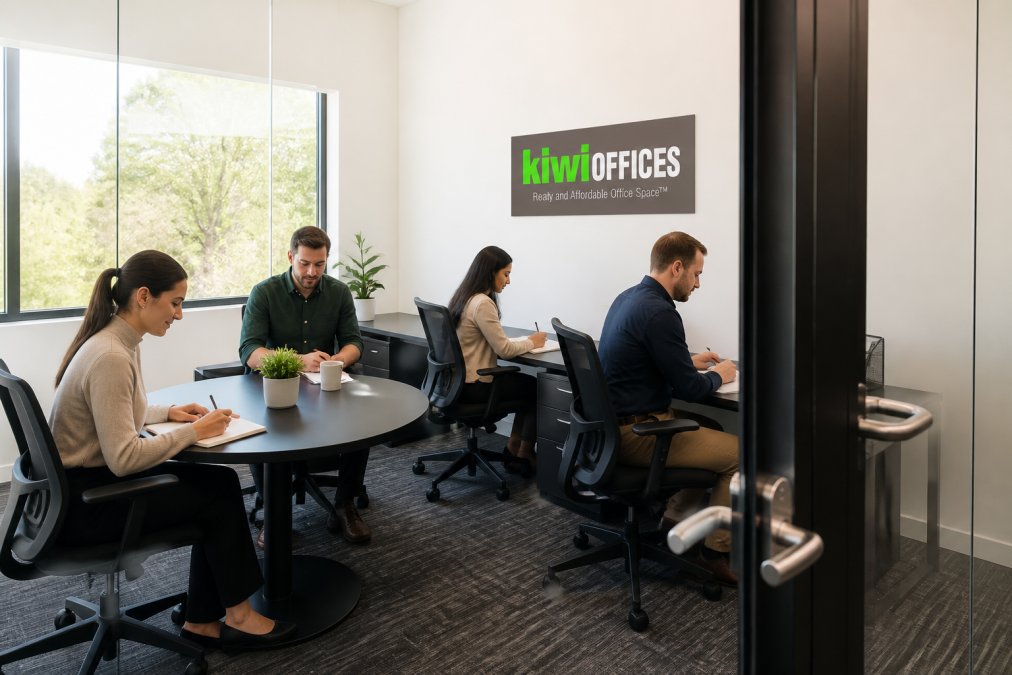
Kiwi Offices provides turnkey, furnished private suites designed for small businesses, not shared desks. That distinction matters most for teams that meet clients in person.
Pros and Cons
Pros:
- Turnkey furnished offices, no build-out required
- Private individual suites, not shared or co-working space
- Ready-to-use environment for fast move-in
Cons:
- Private suites cost more than a hot desk, because you are paying for exclusivity
- Suited to teams of roughly 1-8, not large departments
Pricing depends on suite size and term length, so request a quote.
2. Industrious: Premium Private Offices With All-Inclusive Pricing
Industrious targets teams wanting a polished environment without the corporate feel of legacy providers. Its private offices come fully furnished, and pricing bundles internet, printing, and snacks into one figure.
3. Office Evolution: Community-Focused Suites and Virtual Services
Office Evolution blends private suites with virtual office services, making it flexible for teams splitting time between home and a physical location. You can pair a business address and mail handling with on-demand conference room access.
4. Opus Virtual Offices: Business Address and Reception for Remote Teams
Opus Virtual Offices sells presence without square footage: a professional business address for mail and registration, live receptionist call answering, and call forwarding, all without leasing a physical room.
5. Lucid Private Offices: Secure Suites for Privacy-First Teams
Lucid Private Offices builds around fully enclosed suites rather than open-plan desks, with enterprise-grade internet and IT support standard alongside reception services and shared kitchens and lounges. That makes it the pick for teams handling sensitive client information, where a private room is a compliance consideration rather than a preference.
Physical privacy: what "fully enclosed" actually means
A suite is only private if the walls reach the ceiling and the door closes. Ask:
- Do the demising walls run slab-to-slab, or stop at the drop ceiling? A stop-at-ceiling wall lets normal conversation carry into the next suite.
- Is the door solid-core with a sound seal, or a hollow-core door with a gap?
- Is there a white-noise or sound-masking system in the corridors?
- Can a client in the reception area hear a call happening inside your suite?
Network and cybersecurity: the questions competitors skip
A private suite does not automatically mean a private network. Confirm these before moving in:
- Dedicated circuit vs. shared building internet. Ask whether your suite can get its own circuit from the local carrier, or whether all tenants share one building feed. A shared feed means a shared blast radius if another tenant is compromised.
- Private VLAN or subnet. If the network is shared, ask whether each tenant gets an isolated VLAN. Without it, a compromised device in another suite can reach yours.
- Wi-Fi encryption. Confirm the network uses WPA3 or WPA2-Enterprise with per-tenant credentials, not a single building-wide password.
- Wired drops. Count the ethernet drops in the suite. A team of four running video calls all day will saturate Wi-Fi; wired drops are the fix.
- Access control. Ask whether entry is badge-controlled with an audit log, or a shared key. An audit log matters if you ever need to demonstrate who had access to a room.
- Visitor management. Confirm how guests are logged and escorted, and whether the reception desk keeps a record.
Compliance and insurance fit
For teams in regulated fields, two more items matter:
- Cyber-liability insurance. Confirm whether the operator carries it and whether your own policy covers an incident on a shared network. If the network is shared, your policy may need an endorsement.
- Data-handling policy. Ask whether the operator's staff can enter your suite, under what conditions, and whether they sign a confidentiality agreement.
The trade-off
The cost of that privacy is a quieter social scene and a higher rate than a coworking desk. Teams wanting networking and casual collaboration will find Lucid less social, but for teams whose client work requires confidentiality, that is the point. Confirm the technical controls above rather than assuming "private suite" means "private network."
Flexible Office Lease Terms for Startups: What to Check Before You Sign
Flexible office lease terms for startups matter more than the monthly rate: a cheap suite with a rigid 24-month commitment is more expensive than a pricier one you can exit in 60 days. The two things that decide whether a small team saves or bleeds money are the exit clause and the total cost of occupancy, so this section covers both.
The exit clause: how to leave without a penalty
- Notice period. Confirm whether it is 30, 60, or 90 days, and whether notice must be delivered in a specific form (certified mail, portal submission, or email to a named contact).
- Early-termination fee. Some operators charge a flat fee; others charge the remaining balance of the term. Ask for the exact formula, not a verbal "we'll work with you."
- Deposit refund conditions. Confirm what triggers a deduction, damage, cleaning, unreturned keys or badges, and the timeline for return.
- Auto-renewal traps. Many agreements roll month-to-month automatically unless you give notice 30 days before the term ends. Calendar that date the day you sign.
- Personal guarantee. If the agreement requires an owner's personal guarantee, your business entity does not shield you from the remaining balance.
A practical pattern that works for teams of one to eight: negotiate a 6- or 12-month initial term with a written right to extend month-to-month, rather than accepting the standard 24-month term the sales sheet quotes first. Operators rarely advertise this, but many will grant it for a small rate premium.
Total cost of occupancy: the line items that inflate the base rate
The advertised rate is rarely the rate you pay. Build a simple spreadsheet and price every line below before you compare two providers:
| Cost line | Typical structure | Watch for |
|---|---|---|
| Base rent | Per suite, per month | Whether it steps up after month 6 or 12 |
| Parking | Per stall, per month | Whether it is bundled or metered |
| Meeting-room hours | Bundled credits, then hourly | Overage rate per hour |
| Printing and copying | Per page after an allowance | Color vs. black-and-white rates |
| After-hours HVAC and access | Per hour or per badge | Whether weekend access is included |
| Guest and day-pass fees | Per visit | Whether remote staff count |
| Setup and signage | One-time | Whether it recurs at renewal |
| Mail handling | Per piece or bundled | Forwarding charges |
Expansion rights and hybrid fit
Two more clauses decide whether the space survives your next growth spurt:
- Expansion rights. If you grow from four to eight people, can you add an adjacent suite without signing a new agreement at current market rates? Get a right of first refusal on contiguous space in writing.
- Hybrid policy fit. For a partially remote staff, confirm guest and day-pass rules. A workspace that charges per visit for remote employees can quietly erase the savings of going hybrid in the first place. Ask whether the operator offers a pooled day-pass bundle for teams that split time between home and the office.
IT and security questions to ask before signing
Small teams handling client data should treat the network as part of the lease. Ask:
- Who manages the internet connection, and is there a service-level commitment on uptime?
- Can you get a private VLAN or dedicated circuit, or is the network shared across all tenants?
- Is the Wi-Fi encrypted with a per-tenant credential, or a single shared password?
- What is the visitor and access-control policy, keyed entry, badge, or front-desk sign-in?
- Does the operator carry cyber-liability insurance, and does your own policy cover a shared-network incident?
Frequently Asked Questions
Who is Regus' biggest competitor for small teams?
No single provider dominates. For small teams wanting private suites instead of hot-desking, the strongest Regus alternatives include Kiwi Offices, Industrious, Office Evolution, Opus Virtual Offices, and Lucid Private Offices. Each targets a different need: Kiwi Offices and Lucid focus on fully private turnkey suites, Industrious offers premium all-inclusive private offices, Office Evolution blends private suites with virtual services, and Opus Virtual Offices serves remote-first teams that mainly need a business address and live reception.
What should small teams prioritize when evaluating office space providers?
Start with privacy and the type of space: a dedicated private suite beats a hot-desk if you meet clients or handle confidential work. Then check lease terms, including exit clauses and notice periods, because a Regus alternative should remove lock-in, not recreate it. Confirm what is included in the monthly rate: high-speed internet, utilities, mail handling, and meeting room access. Finally, visit in person to judge the professional environment, noise levels, and whether the location works for your commute and clients.
How do flexible office lease terms for startups compare to traditional commercial office space?
Traditional commercial leases often run three to ten years and put maintenance, utilities, and build-out costs on the tenant. Flexible office lease terms for startups are typically month-to-month or annual, with furniture, internet, and services bundled in. That means less upfront capital and faster setup, but you trade some control over the space. Read the termination clause carefully: notice periods of 30 to 90 days are common, and you want the ability to scale up or down without penalties.
What is the real cost of private office vs coworking for a small team?
Coworking memberships usually start lower per person, but the cost of private office vs coworking shifts once you add up hot-desk fees, meeting room credits, printing, and parking. A private suite bundles those into one rate, so the total monthly cost is predictable. Ask each provider for an all-in figure that includes utilities, internet, mail handling, and any setup fees. With no published pricing from most providers, request a written quote so you can compare like for like.
How quickly can a small team move into a private office suite?
Turnkey providers can often have a team of one to eight people working within days, not months, because the space comes furnished with internet, utilities, and reception already in place. There is no build-out, no furniture delivery, and no cabling to arrange. Ask about the onboarding process and what you need to provide, such as a certificate of insurance. If speed matters, confirm the suite is vacant and ready before you sign anything.
Small teams do not need a global network. They need a private room, predictable costs, and a lease they can exit. Kiwi Offices was built for exactly that: turnkey furnished suites, private individual business spaces rather than shared desks, and a ready-to-use environment you can move into quickly. If you are comparing a Regus alternative for small teams, book a tour of Kiwi Offices and see whether a private suite fits how your business actually runs.